Online tutorialsMini-PSDs 
chromasia.com

Critique Slot Screencasts …

Our Critique Slot Screencasts provide our members with an exciting opportunity to:

  1. Get detailed and constructive feedback on one of their own images.
  2. Gain an insight into how other members postprocess their images.
  3. See how I might have processed that particular image.

In the first section of each video we look at the various changes that were made to the supplied image, and talk through both the technical and aesthetic merit of each change. In the second part I either rework these changes or reprocess the image from the original RAW file to produce a new version. In addition to the QuickTime video you will also be able to download my version of the image, the original PSD file (both at a resolution of around 1000px wide) and the photographer's notes for each image.

I should also mention that my versions are recorded live, hopefully in one take! I work through the image from start to finish rather than just explaining a set of pre-existing adjustment layers.

Annual subscribers can view the screencasts and download the support files (PSDs and photographer's notes) from the relevant members’ page.

How do I subscribe to the Critique Slot Screencasts?

To subscribe to our tutorials, and gain immediate access to our Critique Slot Screencasts, our entire range of tutorials, Mini-PSDs, and other content, you can use the PayPal buttons below to sign up. Alternatively, take a look at our main tutorials page or see below for further details.

PayPal PayPal
MONTHLY SUBSCRIPTION
£6.00 for the first month
then just £3.00 each month
ANNUAL SUBSCRIPTION
£30.00 per year
Critique Slot Screencasts (the archive) • updated monthly
Members' version … My version …

Critique Slot #7 • 6 comments
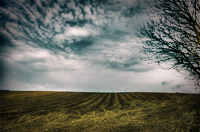
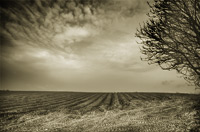
In this, the seventh of our Critique Slot Screencasts, we begin by working through the changes that were made to an image supplied by Doug Stroud. In the second part of the video we take a look at how I would post-process this image, taking into account Doug's creative aims.

published: 11th January, 2012
duration: 59m 40s
video size: 1280px by 800px
file size: 549.6MB

Critique Slot #6 • 5 comments
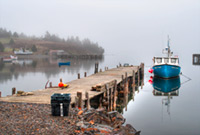
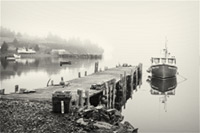
In this, the sixth of our Critique Slot Screencasts, we begin by working through the changes that were made to a tone mapped image supplied by April Pinsonneault. In the second part of the video we take a look at how we would create the HDR image in Photomatix Pro before moving on to take a look at how to post-produce two versions: one colour, one black and white.

published: 27th June, 2011
duration: 1hr 16m 54s
video size: 1280px by 800px
file size: 1.34GB

Critique Slot #5 • 7 comments
In this, the fifth of our Critique Slot Screencasts, we begin by working through the changes that were made to an image supplied by Natasha Klein. In the second part of the video we take a look at how I would process this image to produce an alternative version.

published: 28th January, 2011
duration: 50m 36s
video size: 1280px by 800px
file size: 625MB

Critique Slot #4 • 2 comments
In this, the fourth of our Critique Slot Screencasts, we begin by working through the changes that were made to an image supplied by Jeremy Henderson. In the second part of the video we take a look at how I would process this image to produce an alternative version more congruent with Jeremy's aims.

published: 16th December, 2010
duration: 30m 18s
video size: 1280px by 800px
file size: 337MB

Critique Slot #3 • 6 comments
In this, the third of our Critique Slot Screencasts, we begin by working through the changes that were made to an image supplied by Ricardo Herrera. In the second part of the video we take a look at how I would process this image to produce an alternative version.

published: 27th September, 2010
duration: 41m 17s
video size: 1280px by 800px
file size: 965MB

Critique Slot #2 • 14 comments
In this, the second of our Critique Slot Screencasts, we begin by working through the changes that were made to an image supplied by Brooks Potteiger. In the second part of the video we will take a look at how I would process this image, paying particular attention to simplifying the editing process (to produce a higher quality final image) and working towards emphasising particular elements within a scene (through cropping and selective enhancement).

published: 2nd August, 2010
duration: 47m 34s
video size: 1080px by 675px
file size: 149.3MB

Critique Slot #1 • 36 comments
In this, the first of our Critique Slot Screencasts, we begin by working through the changes that were made to the original image (provided by Stephen Brewell). In the second part of the video we will take a look at how I would process this image to produce three different versions: one colour, one black and white, and one sepia toned version.

published: 30th June, 2010
duration: 37m 27s
video size: 1080px by 675px
file size: 124.1 MB

Contact us

If you have any questions about any of the information on this page, or would like to ask us anything else about our Photoshop tutorials or training, please email us using the following link

How to subscribe …

To subscribe you just need to click either of the ‘PayPal subscribe’ buttons below.

MONTHLY SUBSCRIPTION
A monthly subscription is £6.00 for the first month, then just £3.00 a month thereafter – equivalent to £39.00 per year. Subscribe now and gain access to all our tutorials, Mini-PSDs, Critique Slot Screencasts, various members’ offers and our dedicated forum.
ANNUAL SUBSCRIPTION
For £30.00 per year you can take out an annual subscription. This will give you access to all our tutorials, Mini-PSDs, Critique Slot Screencasts, various members’ offers and our dedicated forum.
CURRENT MEMBERSHIP INFORMATION
We have 2773 current subscribers • updated at 03:13:50 GMT on 13/2/2012
Solution Graphics
Further information

To find out more about our other individual tutorials please click any of the following images. Alternatively, you can visit our main tutorials page for further information on: our annual subscriptions; our forthcoming issues; and our current members’s offers. You can also read through our sample tutorial on Tonal Range and the Curves tool.

Mini-PSDs
We introduced our Mini-PSDs in February 2010, and release a new image every week. Click here to see the full list of Mini-PSDs and find out more about this feature.
Critique Slot Screencasts
Our Critique Slot Screencasts provide our members with an exciting opportunity to get detailed and constructive feedback on one of their own images, gain an insight into how other members postprocess their images, and see how I might have processed that particular image. Click here to find out more.

David J. Nightingale © 2003–12 • all rights reserved

recent comments

A wonderful educational experience. I think it will be beneficial to watch several times. Especially appreciated was hearing your decision making process. Looking forward to next month.

Fantastic! I learned a LOT about Photoshop just from that video...now I can't wait to start adjusting my images more than just using a RAW converter. Maybe some images of mine that I am ready to delete might have some life after all. Thanks David!

These monthly video tutorials are going to be extremely beneficial; I can’t wait for the upcoming ones. It was great being able to watch the original image being transformed. The written tutorials are fantastic but there is still something to be said about visual learning. I enjoyed being able to see and hear the decision making that occurs, the likes and dislikes of the image, the inspection, and how you constantly return to previous layers to make adjustments. I felt like I had polished up some of the technical details from what I had learned by reading your written tutorials. Excellent work!

This was a great tutorial, full of detail and essential information, presented in a relaxed and accessible manner that sets a real benchmark for any teaching professional. Thanks very much, I really enjoyed this experience.

Absolutely fantastic. The commentary / thought process that goes on behind the various adjustments is invaluable. Thanks!

David, excellent! Wonderful addition to your already outstanding tutorials. I anxiously await next months screencast! Again, thank you for sharing your technical knowledge and your artistic thoughts with the rest of us.

This was a great addition to Chromasia. The information was delivered in a thorough and intelligent manner. I am very happy that I have the lifetime membership and I look forward to many more tutorials like this one. Thank you!

This approach is exactly what I needed - sound technique coupled with artistic intuitiveness presented clearly and in an understandable manner, yet acknowledging the flexibility of choices we all have. I definitely look forward to more of these.

I love these. I learn the techniques from your tutorials, but these videos put everything together for me. Learning why you made the processing decisions that you make is incredibly helpful. Thank you for making these screencasts, I look forward to the next one.

software links

Our annual subscribers and lifetime members can obtain a 15% discount on any of the Topaz Labs Photoshop plugins or plugin bundles.
Our annual subscribers and lifetime members can obtain a 15% discount on Photomatix Pro.
training partners


Included above are links to a number of our training partners that we unreservedly recommend.

Online tutorialsMini-PSDs 
chromasia.com